The Click to Chat plugin integrates Google Ads Conversion tracking for WhatsApp clicks, Available in both Free and PRO versions.
Free Version – The plugin calls the gtag_report_conversion function, i.e., the Google Ads Conversion function.
PRO Version – Creates a Google Ads Conversion event based on the given conversion ID and conversion label.
To Enable Google Ads Conversion
Navigate to Click to Chat → Analytics → Google Ads Conversion. Enable Google Ads Conversion, enter the Conversion ID and Conversion Label, then click Save.
Free Version
The Free version calls the gtag_report_conversion function when the WhatsApp button is clicked.
If this option is enabled, whenever a user clicks on WhatsApp, the plugin calls the gtag_report_conversion function. ( make sure gtag_report_conversion is already setup on your website.)
Note: Please set up Google Ads (Global Site Tag) and conversion code (Event snippet). The plugin won’t install Google Ads. It calls gtag_report_conversion whenever a user clicks the WhatsApp widget.
PRO Version
The Pro version creates a Google Ads conversion event using the provided Conversion ID and Conversion Label. There is no need to add the gtag_report_conversion function or the conversion event snippet; the plugin handles the event.
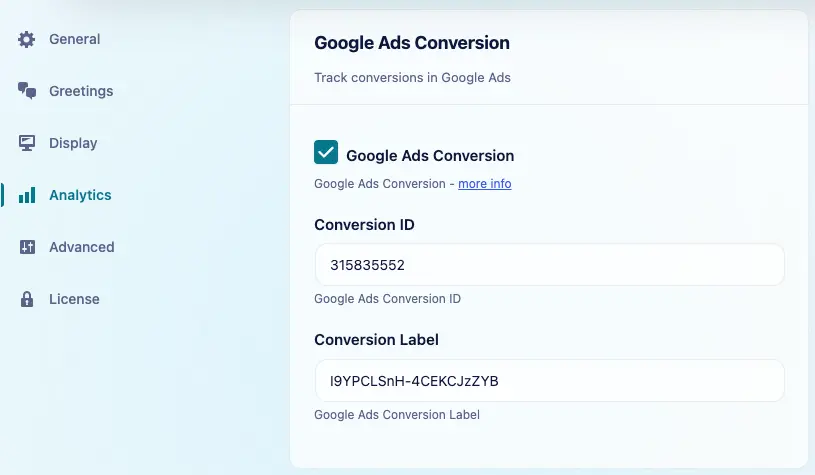
When Google Ads Conversion is enabled and both values are added, the plugin creates a conversion when a visitor clicks to chat.
The Conversion ID and Conversion Label are available in the tag setup for your Google Ads conversion action.
Note: Make sure the Google tag is installed on your website.