A simple WhatsApp Icon
Style 2 offers a straightforward WhatsApp green square icon that adds a clean and professional look to your website.

To Apply Style 2
- Go to Click to Chat → General → Widget Style & Position.
- Select Desktop and choose Style 2 from the style grid.
- Click Save.
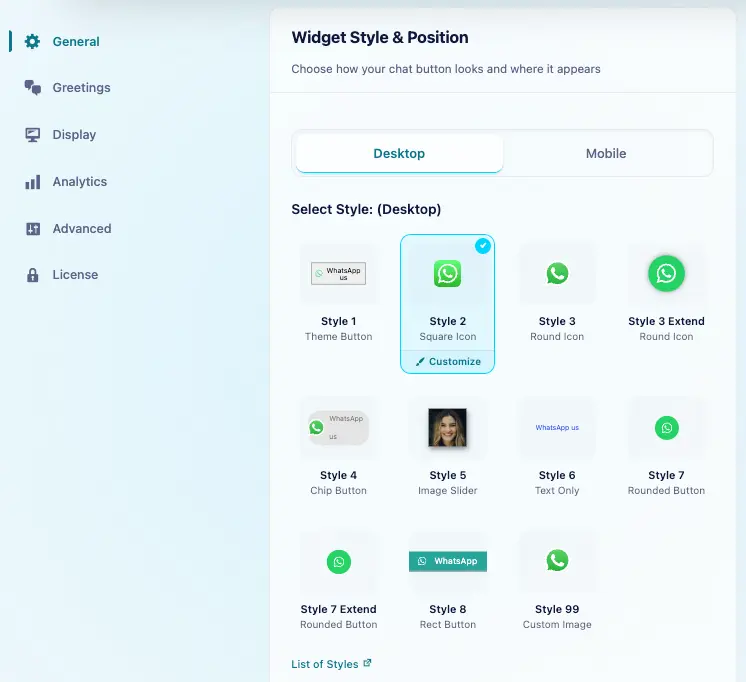
We can use the same style for desktop and mobile. To choose a different style for mobile, turn off Mobile and Desktop same settings.
Customization
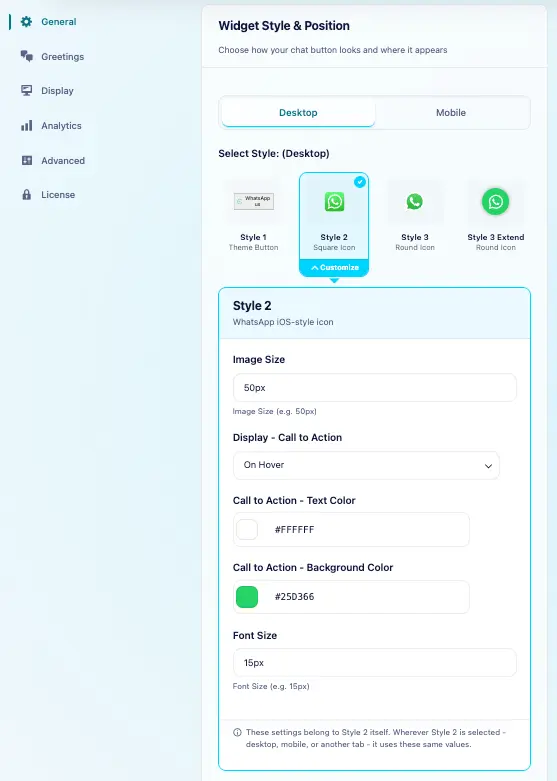
Select Style 2 in the style grid, then click the Customize brush icon that appears on the selected style. Edit its appearance and click Save. Saved changes apply wherever Style 2 is used.
Key Features
- Customizable Image Size: Adjust the image size to fit your preferred dimensions.
- Call to Action Options: Display the Call to Action stick (CTA) on
- hover,
- show it permanently,
- If the CTA is hidden and the cursor hovers over the icon, the CTA title appears as usual, rather than following the plugin settings.
- CTA Customization: Change the CTA text color, background color, and even the font of the CTA text to match your website’s design.
Style 2 is perfect for users who want a simple WhatsApp icon with flexible CTA options, ideal for businesses seeking a professional, engaging design.