The Share feature allows your website visitors to quickly share the current web page or blog post via WhatsApp with just one click. This helps increase your website’s visibility and reach through direct sharing by users.
Enable the Share Feature
Navigate to Click to Chat → Advanced → Group, Share features.
Check Enable Share Features and click Save.
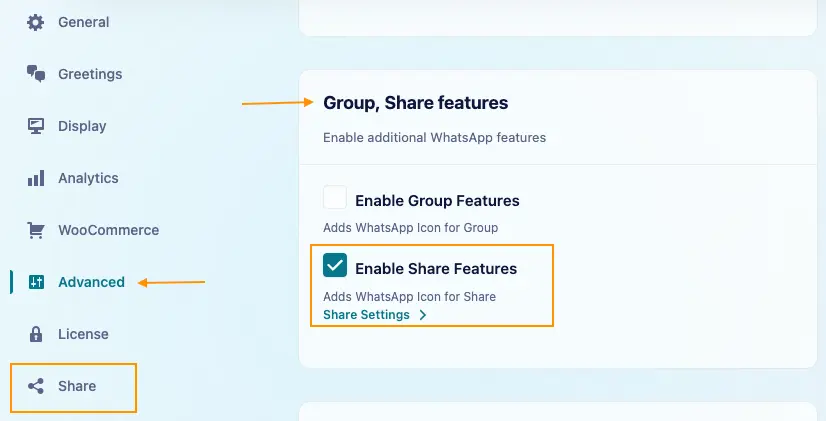
Once enabled, Share appears in the plugin’s sidebar. Click it to reveal the Share Settings submenu.
Navigate to Click to Chat → Share → Share Settings to configure the widget.
Under Share Settings, configure the following:
- Share Text: Add a message such as
Check out this page: {{url}}to include the page link. Share Text Documentation - Call to Action: Add widget text, such as Share on WhatsApp.
- Web WhatsApp on Desktop: Open WhatsApp in the desktop browser and the WhatsApp app on mobile.
- Share Widget Style & Position: Choose the widget’s style and position for Desktop and Mobile.
- Devices: Choose Show or Hide for desktop and mobile.
- Pages: Control visibility using Global Display, page-type overrides, or Page/Category Lists.
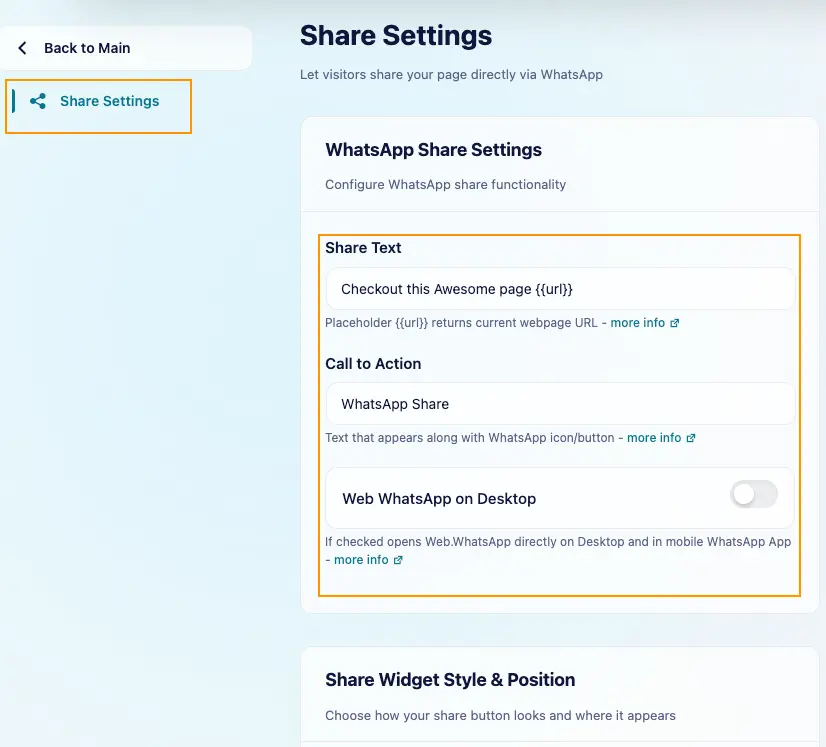
Click Save after making changes. Open a page where the Share widget is enabled and click it to check that WhatsApp opens with your Share Text and the correct page link.
Shortcode
Shortcodes for Share: