Unlock Advanced Click to Chat Features
Take the chat integration to the next level with Advanced Pro features designed for businesses that demand more.
Premium Features That Drive Results
Discover our most Advanced features designed to transform the customer engagement and boost conversions.
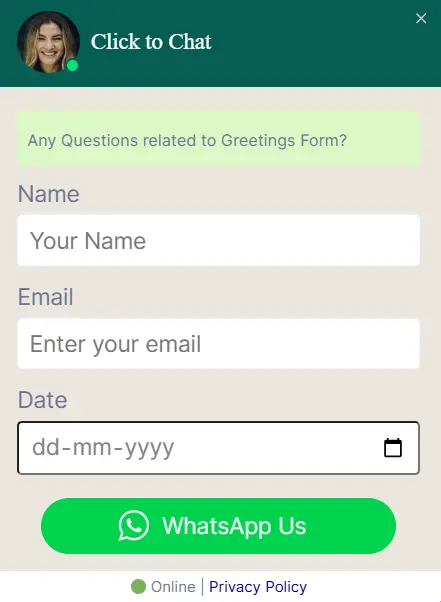
Greetings – Form Filling
Collect visitor details like name, email, and phone before chat to qualify leads, personalize responses, and offer instant support.
- Field types: Text, Date, Checkbox, Select, Email, Number
- Pre-fill chat messages with form data
- Required fields & conditional logic
- Lead qualification automation
Multi Agent Support
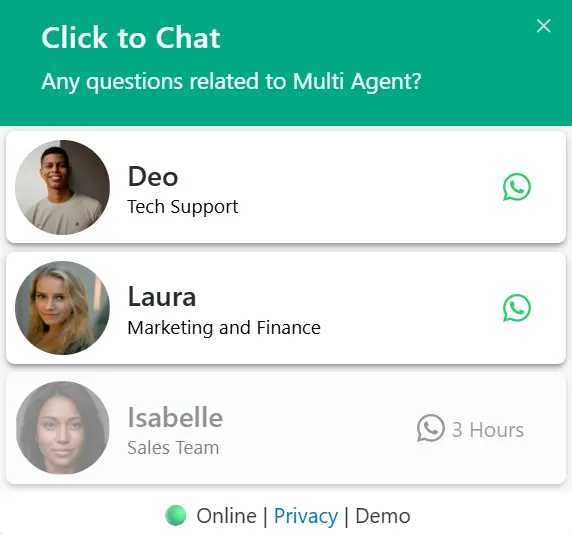
Add multiple agents with custom availability and route chats to the right team, making support easier to manage and scale.
- Unlimited agents with custom profiles
- Multiple time slots within the day per agent
- Time-based routing & availability
- Load balancing & smart distribution
Business Hours
Set clear business hours with flexible time ranges, and the widget will automatically show online or offline so customers know when we’re available.
- Week-wise scheduling with day-specific hours
- Multiple time slots per day (morning, afternoon, evening)
- Offline behavior: Hide widget or show alternate number
- Custom offline call-to-action messages
- Real-time automatic status updates
Everything we need to Elevate
Powerful features that help us to capture more leads, automate workflows, and deliver exceptional customer experiences.
Random Number
Distribute incoming chats evenly across the team. A random chat number is selected each time a user clicks to chat, ensuring balanced workload distribution.
- Load balancing
- Fair distribution
- Multiple number support
Google Ads Conversion
Track chat interactions as Google Ads conversions. Optimize campaigns, and understand which ads drive the most valuable conversations.
- Conversion tracking
- Campaign optimization
- Track WhatsApp Button Conversions
Absolute Position
Position the chat widget anywhere on the page with pixel-perfect precision. Use absolute positioning to place the widget exactly where we want it for optimal visibility and user experience.
- Pixel-perfect positioning
- Custom X & Y coordinates
- Responsive positioning options
Greeting Actions
Define custom actions when users interact with greetings. Trigger specific behaviors, redirect to pages, or execute custom JavaScript based on user choices.
- Click Trigger (ctc_greetings)
- Scroll Trigger (ctc_greetings_now)
- Time Delay (show after x seconds)
- Scroll Delay (show after y seconds)
Display Settings
Control chat widget visibility with advanced display rules. Show or hide widgets based on visitor’s geographic location and login status for personalized experiences.
- Display Based on Country
- Display Based on Login Status
Advanced Analytics
Access advanced variables to get data from triggered-page data, cookie values, and URL parameters for more accurate insights.
- Variables: {url}, {number}, {time}, {title}
- Cookie values: [[_ga]]
- URL parameters: [utm_source] & [gclid]
Greetings in WooCommerce
Customize the greeting dialog content specifically for shop pages and single product pages, and pre-fill product details, cart information, and customer data for smoother e-commerce support.
- Product-specific Greetings
- Greeting content for shop pages
- Product inquiry through WhatsApp
Page Level Settings
Override global settings with page-specific configurations. Perfect for creating targeted experiences. We can customize the following options at the page level for specific pages:
- Widget Style for Mobile and Desktop
- Custom URL
- Time and Scroll Delay
- Page Level Greetings Content
Ready to Upgrade the chat experience?
Get access to all pro features and take the customer engagement to the next level.
View Pricing PlansAll this features included in Pro plan